Production SaaS Architecture: From Zero to Enterprise-Ready in 12 Weeks
A deep dive into building a multi-tenant SaaS platform with separate API and frontend, event-driven processing, multi-environment deployments, and enterprise security patterns.
Production SaaS Architecture: From Zero to Enterprise-Ready in 12 Weeks
Your startup has product-market fit. Users are signing up. Now you need infrastructure that scales without breaking — infrastructure that enterprise clients will trust with their data. The architecture decisions you make today determine whether you'll be rewriting everything in six months or smoothly onboarding your hundredth customer.
This guide documents how we built a production SaaS platform from scratch: a monorepo with separate API and frontend applications, event-driven job processing, multi-environment deployments on Azure, and the security patterns that enterprise clients require. We'll cover the technology choices, architectural patterns, and the 12-week timeline that took us from empty repository to live production traffic.
Architecture Overview
Before diving into implementation, understand the high-level structure. The platform follows a distributed monolith pattern — a monorepo containing multiple deployable applications that communicate through well-defined interfaces.
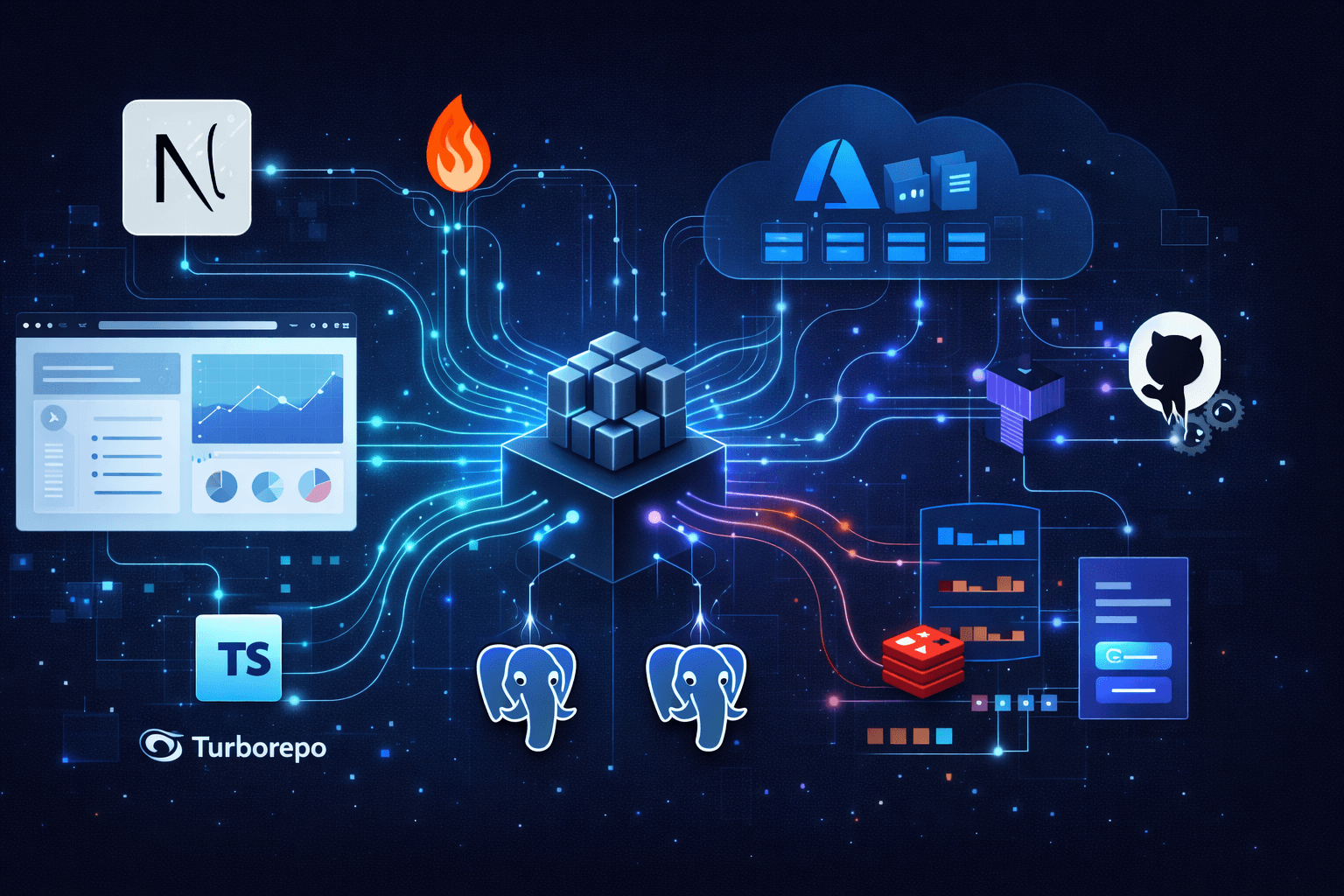
 Production SaaS architecture diagram showing Next.js web app and Hono API on Azure Container Apps, with dual PostgreSQL databases, Redis queue, and BullMQ workers
The architecture separates concerns across distinct layers:
- Web App (
Next.js) handles user authentication, UI rendering, and subscription management — communicating with its ownPostgreSQLdatabase for user data - API App (
Hono) manages business logic, data processing, and external integrations — with its ownPostgreSQLdatabase for business entities BullMQWorkers run within the API application process, connecting toRedisfor job queue coordination- Webhook communication enables async notifications from API back to Web when background jobs complete
Core Principles
Separation of Concerns: The web application handles user authentication, subscription management, and UI rendering. The API handles business logic, data processing, and external integrations. Neither knows implementation details of the other.
Event-Driven Processing: Long-running operations (report generation, external API calls, data processing) happen asynchronously through job queues. Users get immediate feedback while work happens in the background.
Database Isolation: Each application owns its data. The web database stores users, sessions, and subscription states. The API database stores business entities and processing results. This prevents coupling and enables independent scaling.
Infrastructure as Code: Every cloud resource is defined in Terraform, versioned in git, and deployed through CI/CD. No manual console clicking, no configuration drift.
Technology Stack
Monorepo Structure
We use pnpm workspaces with Turborepo for monorepo management:
acme-saas/
├── apps/
│   ├── web/          # Next.js frontend (port 8080)
│   └── api/          # Hono.js API (port 8787)
├── packages/
│   ├── types/        # Shared TypeScript interfaces
│   ├── eslint-config/
│   └── typescript-config/
├── terraform/
│   └── azure-container-apps/
├── .github/
│   └── workflows/
├── turbo.json
└── pnpm-workspace.yaml
The workspace configuration:
# pnpm-workspace.yaml
packages:
    - 'apps/*'
    - 'packages/*'
Turborepo orchestrates builds with dependency awareness:
{
	"$schema": "https://turbo.build/schema.json",
	"tasks": {
		"build": {
			"dependsOn": ["^build"],
			"outputs": [".next/**", "dist/**"]
		},
		"lint": {
			"dependsOn": ["^lint"]
		},
		"type-check": {
			"dependsOn": ["^type-check"]
		}
	}
}
Frontend: Next.js 15
The web application uses Next.js 15 with the App Router:
// next.config.js
const config = {
	output: 'standalone', // Required for containerization
	serverExternalPackages: ['bull', 'ioredis'], // Native Node.js bindings
	images: {
		remotePatterns: [
			{ hostname: 'lh3.googleusercontent.com' }, // Google OAuth avatars
		],
	},
};
Key frontend dependencies:
React 19with Server ComponentsTailwind CSS v4for stylingshadcn/ui+Radix UIfor componentsAuth.js v5for authenticationReact Queryfor server stateReact Hook Form+Zodfor forms
Backend: Hono.js API
The API uses Hono — a lightweight, fast web framework designed for edge and serverless environments:
// apps/api/src/index.ts
import { Hono } from 'hono';
import { cors } from 'hono/cors';
import { logger } from 'hono/logger';
import { bearerAuth } from 'hono/bearer-auth';

const app = new Hono();

app.use('*', logger());
app.use('/v1/api/*', cors());
app.use('/v1/api/*', bearerAuth({ token: process.env.API_KEY }));

// Routes
app.route('/v1/health', healthRoutes);
app.route('/v1/api/business', businessRoutes);
app.route('/v1/internal', internalRoutes);

export default app;
Hono provides:
- Minimal overhead (~14KB)
TypeScript-first design- Middleware ecosystem
- OpenAPI documentation via
Chanfana
Database: PostgreSQL with Drizzle ORM
We use PostgreSQL with Drizzle ORM — a TypeScript ORM that generates SQL you can actually read:
// Example: Standard user table schema
export const users = pgTable('users', {
	id: text('id')
		.primaryKey()
		.$defaultFn(() => crypto.randomUUID()),
	email: text('email').notNull().unique(),
	name: text('name'),
	// ... additional user fields (subscription, profile, etc.)
	createdAt: timestamp('created_at').defaultNow(),
	updatedAt: timestamp('updated_at').defaultNow(),
});
Job Queue: BullMQ with Redis
Long-running operations use BullMQ for reliable job processing:
// Example: Queue configuration with retry logic
const connection = new Redis(process.env.REDIS_URL, {
	maxRetriesPerRequest: null,
});

export const processingQueue = new Queue('data-processing', {
	connection,
	defaultJobOptions: {
		attempts: 5,
		backoff: { type: 'exponential', delay: 60000 },
		// ... additional options
	},
});
Shared Types Package
Type safety across applications through a shared package:
// Example: Shared status enum with Zod validation
export const TaskStatusSchema = z.enum(['pending', 'processing', 'completed', 'failed']);
export type TaskStatus = z.infer<typeof TaskStatusSchema>;

export interface Task {
	id: string;
	status: TaskStatus;
	createdAt: Date;
	// ... additional fields shared between apps
}
Both apps import from the shared package: import { Task } from '@acme/types';
Database Architecture
Dual Database Strategy
We run two PostgreSQL databases — one for each application:
Web Database (acme_web):
- Users and authentication
- Sessions and tokens
- Subscription states
- Webhook event logs
API Database (acme_api):
- Business entities
- Processing results
- Task queues and job metadata
This separation provides several benefits:
- Independent Scaling: The API database handles high-write workloads from job processing without affecting user-facing queries
- Security Isolation: Compromising one database doesn't expose the other
- Deployment Independence: Schema migrations happen independently
- Clear Ownership: Each service owns its data model
Schema Design Patterns
Use consistent patterns across both databases:
// Example: Entity with soft deletes and JSONB
export const entities = pgTable('entities', {
	id: text('id').primaryKey(),
	name: text('name').notNull(),
	status: text('status').notNull(),
	metadata: jsonb('metadata'), // Flexible nested data
	deletedAt: timestamp('deleted_at'), // Soft delete pattern
	createdAt: timestamp('created_at').defaultNow(),
});

// Performance indexes on frequently queried columns
export const entityIndexes = {
	statusIdx: index('entities_status_idx').on(entities.status),
	createdAtIdx: index('entities_created_at_idx').on(entities.createdAt),
};
Migration Strategy
Drizzle Kit generates and runs migrations:
# Generate migration from schema changes
pnpm drizzle-kit generate

# Apply migrations
pnpm drizzle-kit migrate

# Push schema directly (development only)
pnpm drizzle-kit push
Production migrations run during container startup, with automatic rollback on failure. Drizzle Kit handles schema generation and migration management.
Event-Driven Architecture
The Step Orchestrator Pattern
Complex workflows use BullMQ's parent-child job relationships with the step orchestrator pattern:
// Example: Parent job spawns children, waits, then aggregates results
const orchestratorWorker = new Worker('orchestrator', async (job) => {
	const step = job.data.step || 'spawn';

	if (step === 'spawn') {
		// Spawn parallel child jobs with parent reference
		await Promise.all([
			queue1.add('task', job.data, { parent: { id: job.id!, queue: job.queueQualifiedName } }),
			queue2.add('task', job.data, { parent: { id: job.id!, queue: job.queueQualifiedName } }),
		]);
		await job.updateData({ ...job.data, step: 'collect' });
		throw new WaitingChildrenError(); // Pause until children complete
	}

	// All children complete - aggregate results
	const childResults = await job.getChildrenValues();
	return processResults(Object.values(childResults));
});
Flow Structure
A typical data processing flow:
data-processing-flow (orchestrator)
├── Step 1: Spawn children → WaitingChildrenError
│   ├── data-fetch-job (retrieve source data)
│   └── transform-orchestrator-job (coordinate transformations)
│       ├── normalize-job
│       ├── enrich-job
│       └── validate-job
├── Step 2: Collect results → spawn aggregation
│   └── aggregation-job (combine and score)
└── Step 3: Save results → trigger webhook
    └── webhook-notification-job (notify web app)
Retry and Error Handling
Configure retries with exponential backoff and jitter:
// Example: Queue with custom backoff strategy
const queue = new Queue('api-calls', {
	connection,
	defaultJobOptions: {
		attempts: 5,
		backoff: { type: 'exponential', delay: 60000, jitter: 0.5 },
	},
});

// Custom backoff based on error type
const worker = new Worker('api-calls', processor, {
	settings: {
		backoffStrategy: (attempts, type, err) => {
			if (err?.message?.includes('rate limit')) return 120000;
			if (err?.message?.includes('timeout')) return 10000;
			return Math.pow(2, attempts - 1) * 60000;
		},
	},
});
Webhook Communication
The API notifies the web application when processing completes:
// Example: API sends signed webhook notification
async function notifyWebApp(taskId: string, result: TaskResult) {
	const payload = { event: 'task.completed', taskId, result, timestamp: new Date().toISOString() };
	const signature = createHmacSignature(JSON.stringify(payload), process.env.WEBHOOK_SECRET);

	await fetch(process.env.WEB_WEBHOOK_URL, {
		method: 'POST',
		headers: { 'Content-Type': 'application/json', 'X-Webhook-Signature': signature },
		body: JSON.stringify(payload),
	});
}
// Example: Web app receives and verifies webhook
export async function POST(request: Request) {
	const signature = request.headers.get('X-Webhook-Signature');
	const body = await request.text();

	if (!verifyWebhookSignature(body, signature, process.env.WEBHOOK_SECRET)) {
		return Response.json({ error: 'Invalid signature' }, { status: 401 });
	}

	const payload = JSON.parse(body);
	await db.update(tasks).set({ status: 'completed' }).where(eq(tasks.id, payload.taskId));
	return Response.json({ received: true });
}
Infrastructure on Azure
Terraform Structure
All infrastructure is defined in Terraform:
terraform/azure-container-apps/
├── main.tf           # Container Apps, VNet, NSG
├── postgres.tf       # PostgreSQL Flexible Server
├── redis.tf          # Azure Cache for Redis
├── provider.tf       # Azure provider configuration
├── variables.tf      # Input variables
├── outputs.tf        # Exported values
└── environments/
    ├── dev.tfvars
    └── prod.tfvars
Container Apps Environment
Azure Container Apps provides serverless containers with automatic scaling:
# main.tf
resource "azurerm_container_app_environment" "main" {
  name                       = "${var.prefix}-${var.environment}-env"
  location                   = azurerm_resource_group.main.location
  resource_group_name        = azurerm_resource_group.main.name
  log_analytics_workspace_id = azurerm_log_analytics_workspace.main.id

  infrastructure_subnet_id = azurerm_subnet.container_apps.id
}

resource "azurerm_container_app" "web" {
  name                         = "${var.prefix}-${var.environment}-web"
  container_app_environment_id = azurerm_container_app_environment.main.id
  resource_group_name          = azurerm_resource_group.main.name
  revision_mode                = "Single"

  template {
    container {
      name   = "web"
      image  = "${azurerm_container_registry.main.login_server}/web:${var.image_tag}"
      cpu    = var.environment == "prod" ? 1.0 : 0.5
      memory = var.environment == "prod" ? "2Gi" : "1Gi"

      env {
        name        = "DATABASE_URL"
        secret_name = "database-url"
      }
    }

    min_replicas = var.environment == "prod" ? 2 : 1
    max_replicas = var.environment == "prod" ? 10 : 2
  }

  ingress {
    external_enabled = true
    target_port      = 8080
    traffic_weight {
      percentage      = 100
      latest_revision = true
    }
  }
}
Network Security
VNet integration with Network Security Groups restricts traffic to only necessary ports:
resource "azurerm_network_security_group" "container_apps" {
  name                = "${var.prefix}-${var.environment}-nsg"
  location            = azurerm_resource_group.main.location
  resource_group_name = azurerm_resource_group.main.name

  # Allow HTTPS inbound from internet
  security_rule {
    name                       = "AllowHTTPS"
    priority                   = 100
    direction                  = "Inbound"
    access                     = "Allow"
    protocol                   = "Tcp"
    destination_port_range     = "443"
    source_address_prefix      = "*"
    destination_address_prefix = "*"
    # ... other required fields
  }

  # Additional rules for PostgreSQL (5432) and Redis (6380)
  # restricted to VirtualNetwork only
}
PostgreSQL Configuration
resource "azurerm_postgresql_flexible_server" "main" {
  name                = "${var.prefix}-${var.environment}-postgres"
  version             = "16"
  delegated_subnet_id = azurerm_subnet.postgres.id
  # ... resource group, location, credentials

  # Environment-specific sizing
  sku_name   = var.environment == "prod" ? "GP_Standard_D2s_v3" : "B_Standard_B2s"
  storage_mb = var.environment == "prod" ? 65536 : 32768

  high_availability {
    mode = var.environment == "prod" ? "ZoneRedundant" : "Disabled"
  }
}

# Create both databases on the same server
resource "azurerm_postgresql_flexible_server_database" "web" {
  name      = "acme_web"
  server_id = azurerm_postgresql_flexible_server.main.id
}

resource "azurerm_postgresql_flexible_server_database" "api" {
  name      = "acme_api"
  server_id = azurerm_postgresql_flexible_server.main.id
}
Environment-Specific Configuration
Environment variables are defined in separate .tfvars files, allowing the same Terraform code to deploy differently sized infrastructure:
# environments/prod.tfvars
environment = "prod"
prefix      = "acme"

# Production: larger instances, HA enabled, longer backups
web_cpu             = 1.0
web_memory          = "2Gi"
postgres_sku        = "GP_Standard_D2s_v3"
postgres_ha_enabled = true
min_replicas        = 2
max_replicas        = 10
# ... additional prod-specific settings
# environments/dev.tfvars
environment = "dev"
prefix      = "acme"

# Development: minimal resources for cost savings
web_cpu             = 0.5
web_memory          = "1Gi"
postgres_sku        = "B_Standard_B2s"
postgres_ha_enabled = false
min_replicas        = 1
max_replicas        = 2
# ... additional dev-specific settings
CI/CD Pipelines
GitHub Actions Workflow
Separate workflows for each application with automatic environment detection based on branch. GitHub Actions handles CI/CD:
# .github/workflows/web-deploy.yaml
name: Web App CI/CD

on:
    push:
        branches: [main, dev]
        paths: ['apps/web/**', 'packages/**']
    pull_request:
        branches: [main, dev]

jobs:
    test:
        runs-on: ubuntu-latest
        steps:
            - uses: actions/checkout@v4
            - uses: pnpm/action-setup@v4
            - run: pnpm install --frozen-lockfile
            - run: pnpm lint && pnpm type-check && pnpm test --filter=web

    build-and-deploy:
        needs: test
        if: github.event_name == 'push'
        runs-on: ubuntu-latest
        # Auto-select environment based on branch
        environment: ${{ github.ref == 'refs/heads/main' && 'production' || 'development' }}

        steps:
            - uses: actions/checkout@v4

            # OIDC auth - no secrets stored in GitHub
            - uses: azure/login@v2
              with:
                  client-id: ${{ secrets.AZURE_CLIENT_ID }}
                  tenant-id: ${{ secrets.AZURE_TENANT_ID }}
                  subscription-id: ${{ secrets.AZURE_SUBSCRIPTION_ID }}

            # Build, push to ACR, deploy to Container Apps
            # Environment-specific values injected from GitHub environment secrets
            - run: |
                  az acr login --name ${{ vars.ACR_NAME }}
                  docker build -t ${{ vars.ACR_NAME }}.azurecr.io/web:${{ github.sha }} .
                  docker push ${{ vars.ACR_NAME }}.azurecr.io/web:${{ github.sha }}
                  az containerapp update --name ${{ vars.CONTAINER_APP }} \
                    --resource-group ${{ vars.RESOURCE_GROUP }} \
                    --image ${{ vars.ACR_NAME }}.azurecr.io/web:${{ github.sha }}
OIDC Authentication
We use Azure OIDC instead of storing service principal secrets in GitHub. This eliminates credential rotation burden and reduces attack surface — GitHub and Azure exchange short-lived tokens automatically.
Infrastructure Deployment
Terraform runs through a separate workflow triggered by changes to the terraform/ directory. The workflow automatically selects the correct environment based on branch, runs terraform plan for review, and applies changes on merge:
# .github/workflows/terraform.yaml
jobs:
    terraform:
        runs-on: ubuntu-latest
        environment: ${{ github.ref == 'refs/heads/main' && 'production' || 'development' }}
        steps:
            - uses: actions/checkout@v4
            - uses: hashicorp/setup-terraform@v3
            - uses: azure/login@v2
              with:
                  client-id: ${{ secrets.AZURE_CLIENT_ID }}
                  tenant-id: ${{ secrets.AZURE_TENANT_ID }}
                  subscription-id: ${{ secrets.AZURE_SUBSCRIPTION_ID }}

            - run: terraform init -backend-config="key=${{ vars.ENV }}.tfstate"
            - run: terraform plan -var-file="environments/${{ vars.ENV }}.tfvars" -out=tfplan
            - run: terraform apply -auto-approve tfplan
              if: github.event_name == 'push'
Security Patterns
Authentication
User authentication is handled by Auth.js v5 in the Next.js web application. The setup supports multiple providers including Google OAuth and traditional email/password credentials, with JWT-based sessions stored in HttpOnly cookies for maximum security.
The authentication flow is production-ready out of the box: OAuth tokens are automatically refreshed, sessions are cryptographically signed, and the split configuration pattern ensures edge runtime compatibility for middleware-based route protection. Users authenticate once through the web app, receiving a JWT that's passed to the API for authorized requests. The API validates tokens using Hono's built-in JWT middleware, extracting user context for downstream authorization checks.
This architecture delegates the complexity of secure authentication to battle-tested libraries while maintaining full control over session data and user flows.
Secret Management
Secrets are managed at two levels depending on their scope and lifecycle:
Infrastructure-level secrets (database credentials, Redis connection strings, SSL certificates) are provisioned through Terraform and injected directly into Azure Container Apps as secrets. These never touch version control or CI/CD logs:
resource "azurerm_container_app" "api" {
  # Infrastructure secrets managed by Terraform
  secret {
    name  = "database-url"
    value = "postgresql://${var.db_user}:${var.db_password}@${azurerm_postgresql_flexible_server.main.fqdn}:5432/acme_api?sslmode=require"
  }
  # ... additional secrets (redis-url, api-keys, etc.)

  template {
    container {
      env {
        name        = "DATABASE_URL"
        secret_name = "database-url"
      }
      # ... additional env vars referencing secrets
    }
  }
}
Application-level secrets (third-party API keys, feature flags, webhook secrets) are managed through GitHub Actions environment secrets and injected during deployment. This allows different values per environment without Terraform changes.
For enterprise deployments requiring centralized secret management, Azure Key Vault integrates seamlessly with both Terraform and Container Apps. Key Vault provides automatic secret rotation, access auditing, and compliance certifications (SOC 2, HIPAA, PCI DSS) that many enterprise clients require.
Webhook Security
Internal webhooks between API and Web use HMAC-SHA256 signatures for verification. The sending service signs the payload with a shared secret, and the receiving service verifies the signature using timing-safe comparison to prevent timing attacks:
// Signature creation (API side)
const signature = createHmac('sha256', secret).update(payload).digest('hex');

// Signature verification (Web side) - uses timingSafeEqual to prevent timing attacks
const isValid = timingSafeEqual(Buffer.from(signature), Buffer.from(expected));
Rate Limiting
APIs are protected using hono-rate-limiter with different limits per route type: 100 requests/minute for general API endpoints, 10 requests/15 minutes for authentication endpoints. Rate limiting uses the x-forwarded-for header for client identification behind load balancers.
Architectural Phases
Building a production SaaS follows a natural progression where each architectural layer builds on the previous one. Here's how the system comes together:
Phase 1: Foundation Layer
The foundation establishes the monorepo structure and development workflow. pnpm workspaces with Turborepo enable parallel builds across applications, while shared TypeScript configurations ensure consistency. Docker Compose provides a local environment matching production.
At this phase, the development environment deploys to Azure — enabling continuous integration from day one and giving stakeholders visibility into progress.
Phase 2: Data and Identity Layer
The dual-database architecture takes shape with PostgreSQL and Drizzle ORM. Authentication integrates through Auth.js v5 with JWT sessions and OAuth providers. This layer establishes the security boundaries between web and API applications.
Phase 3: Business Logic Layer
API endpoints emerge with Hono.js, documented through OpenAPI specifications. The webhook system enables bidirectional communication between applications. Zod schemas enforce validation at both API boundaries and form inputs.
Phase 4: Async Processing Layer
Redis and BullMQ introduce event-driven architecture. The step orchestrator pattern handles complex workflows with parent-child job relationships. This layer transforms the system from request-response to event-driven, enabling long-running operations without blocking user interactions.
Phase 5: Monetization Layer
Payment integration through Stripe webhooks connects subscription state to feature access. The web database tracks subscription tiers while the API enforces usage limits based on subscription context passed through JWT claims.
Phase 6: Production Hardening
The final phase focuses on observability and resilience: Application Insights for monitoring, rate limiting for protection, health checks for orchestration, and zone-redundant databases for availability. Terraform configurations promote from dev to prod with environment-specific sizing.
Enterprise Considerations
Multi-Tenancy
Each customer's data is isolated through application-level tenant scoping:
// Example: All queries scoped to tenant
async function getRecords(tenantId: string) {
	return db.query.records.findMany({
		where: and(eq(records.tenantId, tenantId), isNull(records.deletedAt)),
	});
}
Audit Logging
Track all sensitive operations with middleware that captures user context, action type, and request metadata. This creates an immutable audit trail for compliance and debugging — essential for enterprise clients requiring SOC 2 or similar certifications.
Compliance Ready
- Data encryption at rest (Azure managed encryption)
TLS 1.3for all connections- GDPR-compliant data deletion flows
- SOC 2 Type II controls documented
- Regular security assessments
SLA Guarantees
Production infrastructure designed for 99.9% uptime:
- Multi-replica deployments
- Zone-redundant
PostgreSQL - Automatic failover for
Redis - Health checks with automatic restarts
- Blue-green deployment support
Key Takeaways
Building a production SaaS requires deliberate architectural decisions:
Monorepostructure enables code sharing while maintaining deployment independence- Separate databases prevent coupling and enable independent scaling
- Event-driven architecture handles long-running operations reliably
Infrastructure as Codeeliminates configuration drift and enables reproducible environmentsOIDCauthentication for CI/CD removes secret management burden- Security layers (authentication, authorization, rate limiting, audit logging) are non-negotiable for enterprise clients
Starting with clean separation of concerns makes future scaling straightforward.
Ready to build your SaaS platform? Check out our architecture consulting services or get in touch to discuss your project.